Creative.Systems

Systems

LINDELIN / SYSTEMS

Music production, visual design and system architecture come together to shape software and the experience of using it.

Creative.Systems

Software has a creative language of its own.

Making a tool means understanding both how it works and why someone would use it. We bring our experience in music production, visual art and system architecture into the same design. Music production informs the rhythm of an interaction and the feedback it needs; visual design makes complex states legible; architecture brings these decisions into a reliable whole.

Communication protocols, the hierarchy of a screen, a finger moving a fader and the display responding to it are considered together from the start. Sound, form and logic shape one another, creating tools that fit the way people work.

PUBLIC RELEASE · v1.0.0

Three bridge applications are now available.

The two Windows audio editions are for anyone who wants physical control of computer sound. UAD Console Bridge for EUCON brings Apollo mixing, preamps, plug-ins and the control room to compatible EUCON surfaces. Each app installs independently and includes plain-language guides in English, Chinese and Japanese.

Development will continue with UAD Console Bridge for Mackie Control. MCU devices vary widely and the protocol cannot map perfectly onto UAD Console, so this edition needs further design and validation. The hardware available for sustained testing is limited and currently EUCON-heavy; contributors who know other excellent controllers, protocols or can help with physical verification are warmly welcome.

Read the release and development journal

01 / A professional tool for music production

UAD Console Bridge for EUCON

Designed for recording, mixing and monitoring.
UAD Console Bridge for EUCON

UAD Console Bridge for EUCON connects the Apollo DSP mixer to a familiar EUCON workspace. Channels, plug-ins and the control room become directly accessible, with continuous feedback from the system. Apollo and UAD Console retain audio processing; the bridge brings professional surface control into that production workflow.

A fader should follow your hand. A parameter needs a meaningful unit. Monitoring and channel mixing need their own places, and a configuration change needs a clear target. These decisions come from music production practice, considered together with hardware semantics, software architecture and visual expression.

Mix

Preserve the channel logic from input to mix

Fader, mute, solo and mono/stereo pan control work in both directions, with native signal and peak feedback. Input, AUX/Cue and MIX pages organise input, send and output controls. Parameters retain engineering units and clear names, keeping surface information useful for production decisions.

Plug-ins

Bring the plug-in workflow to encoders and pages

Inserts and UNISON pages expose their parameters, alongside category browsing, loading and unloading, bypass and existing preset selection. Configuration operations use a selection and confirmation flow. Parameters, pages and their current targets stay connected as you browse, shape a sound and confirm a change.

Control Room

A dedicated place for listening and communication

Monitor level, MUTE, DIM, MONO, source selection and TALK belong to a separate control-room model. This structure follows recording and monitoring practice: channel mixes, headphone feeds and what is heard in the control room each retain a clear role.

Response

Keep continuous control in step with the gesture

Continuous audio controls dispatch immediately, coalescing intermediate positions that have not yet been sent. Old queued values do not accumulate behind a fader gesture. Console updates reconcile the displayed state, while plug-in and configuration changes receive checks before and after the operation.

Professional intent extends to control boundaries and information design.

The desktop view presents connection, sample rate, clock, control-room and per-channel status; audio operation belongs to the surface. Channel-type colours, separate stereo pan readings, native dBFS and UAD REC/MON states keep meaningful differences legible. Read-only, mixing, full and custom scopes define the control available for a session, while a monitor ceiling limits level requests sent by the bridge. Connection or topology changes discard stale operations and rebind to fresh state. Presentation, response and internal rules work together to support decisions in production.

For Windows with Apollo/UAD Console and an Avid EUCON environment. See the project guide for supported functions and devices.
02 / Featured open-source work

Windows Fader Bridge

Bring the studio’s way of working to the everyday desktop.

Faders, encoders and meters make shaping sound a tactile and visible experience. Windows Fader Bridge takes that experience as its starting point, connecting Windows audio devices and applications to professional control surfaces. Browsers, players and everyday software become familiar mixer channels within reach.

Move a fader and the system volume follows; make a software adjustment and the surface updates in return. Names, meters and channel colours identify what you are controlling. Separate EUCON and Mackie Control applications provide these connections, while UAD Console Bridge extends the idea to the Apollo mixer. All three v1.0.0 editions are now released.

Explore the project and source
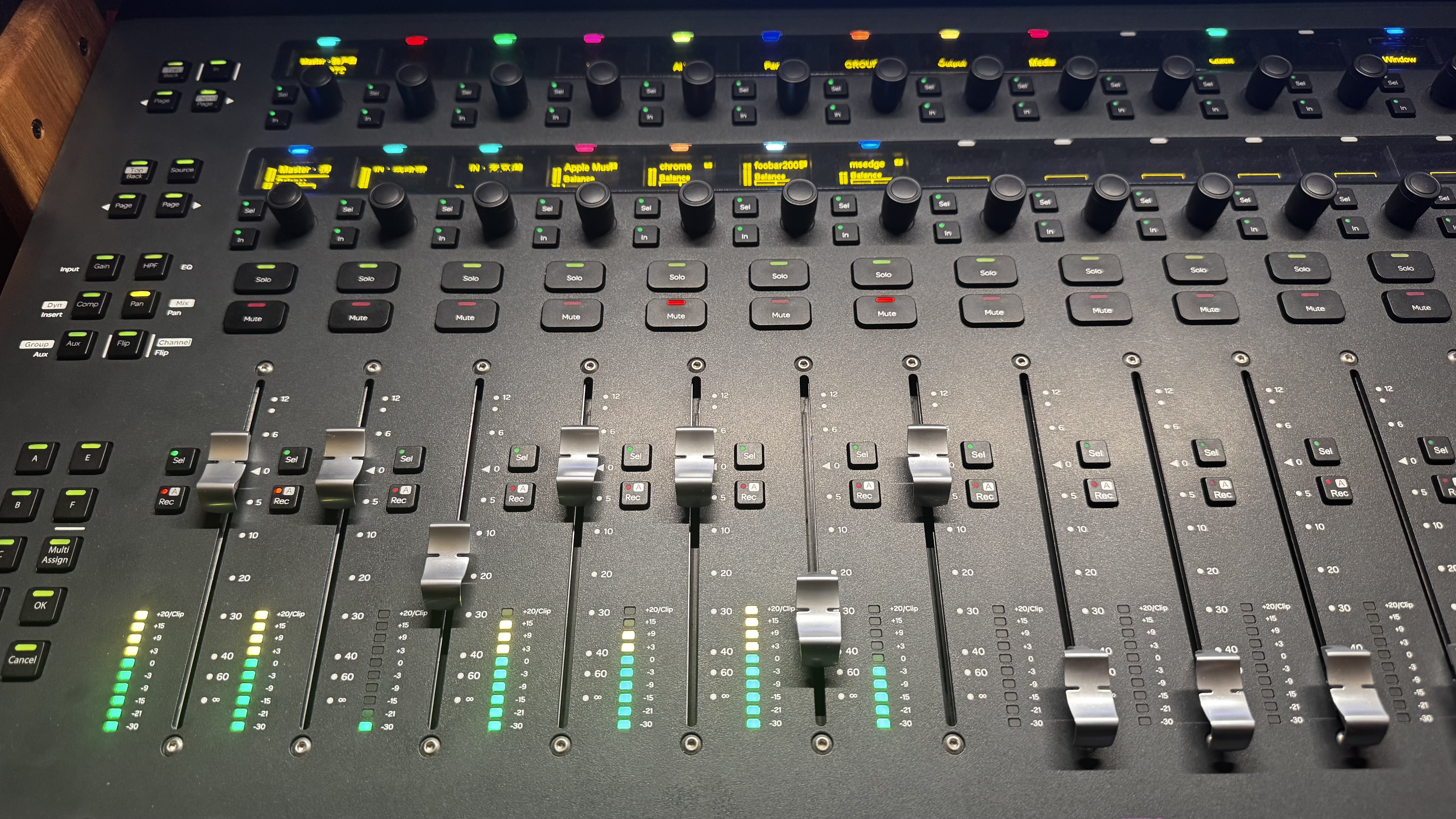
An Avid S3 displaying Windows audio devices, Apple Music and browsers as surface channels
The project in use: Windows devices and applications on an Avid S3. Faders, meters and channel names bring desktop audio onto a physical surface.

01

Connected feedback for hands, eyes and ears

Volume, pan, mute, solo and live metering each have a clear role, informed by music production practice. EUCON channel colours are derived from application icons, carrying familiar visual cues onto the surface. The gesture, the display and the audible change belong to the same experience.

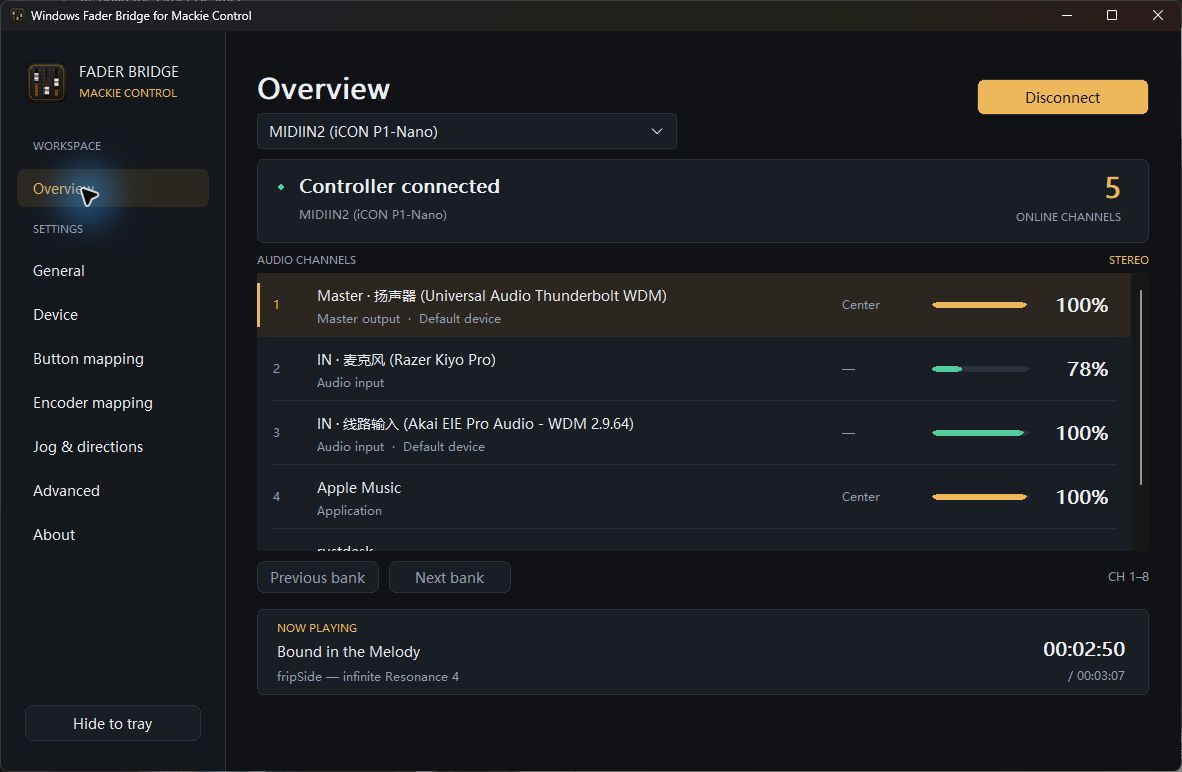
Windows Fader Bridge for Mackie Control showing its English overview with connection status, audio channels, meters and playback information
The actual Mackie workspace: connection status, channel meters and playback information in one everyday view.

02

An interface shaped around the interaction

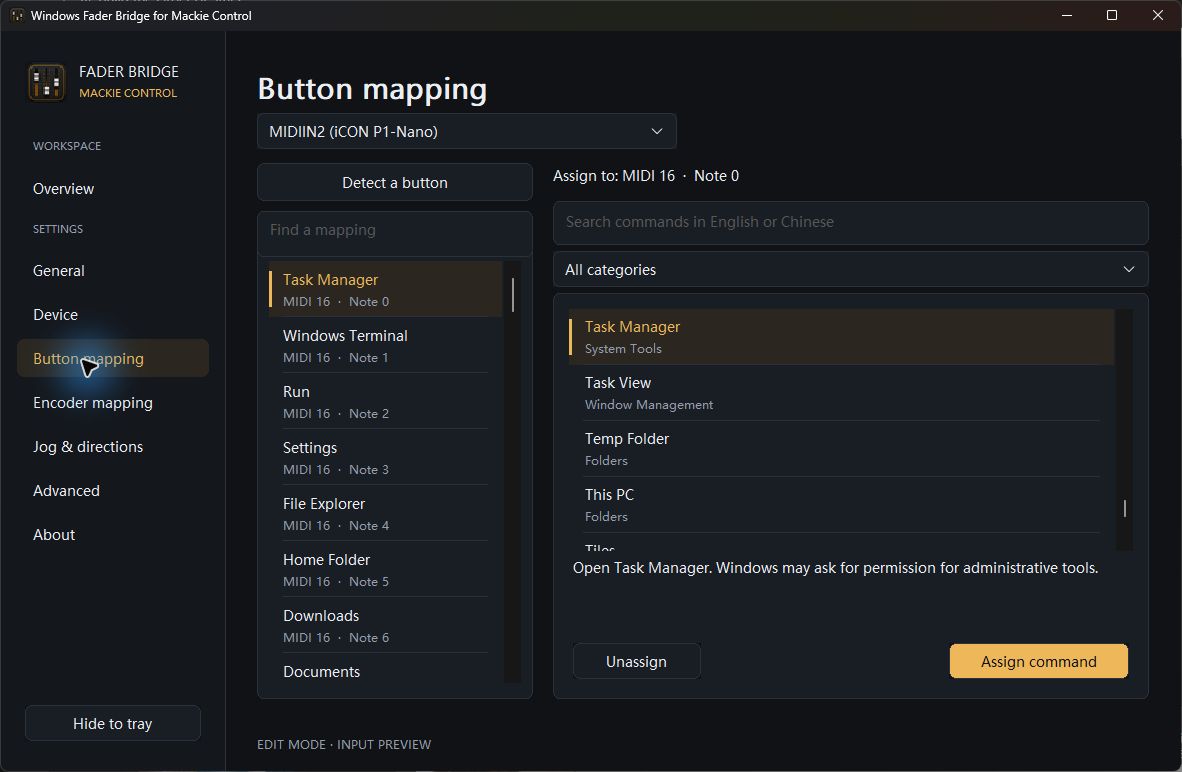
The Mackie edition uses graphite surfaces, amber for selection and action, and green for connection and metering. Channels, devices and playback information have a clear hierarchy. Commands are searchable in Chinese and English, with readable descriptions. During assignment, custom gestures from the selected device are previewed, supporting a deliberate flow from trying to confirming.

Windows Fader Bridge for Mackie Control button mapping with command search, categories and descriptions
Command assignment: start with a physical control, find an action, understand it and assign it.

03

Continuity begins in the architecture

As applications open, close or change audio sessions, a fader under your hand must keep addressing the right target. Stable channel identities and touch protection support that continuity. Audio models, control protocols and presentation have distinct responsibilities; the three applications also retain independent settings and runtime state.

Two ways to control Windows audio.

The EUCON and Mackie Control editions run independently, bringing desktop audio into different control environments.

Windows Fader Bridge for EUCON

Presents Windows devices and applications as controllable channels through Avid’s EUCON runtime. Alongside physical surfaces, Avid Control on iPad offers faders, meters and soft keys.

Validated with Avid S3 and Avid Control.

Download and user guide

Windows Fader Bridge for Mackie Control

Connects over MIDI to controllers in MCU mode. Mixer controls, media actions and assignable Windows commands come to faders, encoders and buttons, with a dedicated desktop settings workspace.

Core workflows have been validated with iCON P1-Nano. See the project documentation for other controller compatibility.

Download and user guide

Open the work, and the thinking behind it.

The source is available under MPL-2.0, alongside architecture, interface design and verification records. We want the work to be used, understood, discussed and developed further. Required vendor SDKs are obtained separately from their providers.

03 / System design within a game

Creative.Games × Creative.Systems

A game’s craft extends into its architecture.

The making of Tidemarks of Summer extends from story, music and artwork into the structures supporting them. Listening to a track, composing a picture, moving through the game with a controller: each deserves the same attention to design.

Explore Tidemarks of Summer
Tidemarks of Summer key visual featuring the characters by the summer sea

Music

Music appreciation, beyond the lock screen

The gallery is designed with the experience of a music app in mind. A dedicated playback service connects to system media controls, publishing titles, cover art, playback state and progress, and receiving play, pause and track commands. On mobile devices and browsers that support background media playback, listening continues after the screen is locked.

Studio

Make the composition yours in Hotaru’s Photo Studio

Choose from the game’s portraits, costumes and backgrounds, add characters, move, resize and flip them, adjust their layering and export the finished composition. Asset browsing, layer editing and image export turn favourite artwork into creative material for a picture of your own.

Controls

Care for every controller interaction

Confirmation, back, page turning, fast-forward and menu navigation have dedicated controls, with prompts adapting to the active input and recognised controller family. Held buttons, transitions between screens, and moving characters or changing assets in the studio are considered as parts of a continuous interaction.

Performance

Resource management in service of the work

Dedicated resource management determines which assets a scene needs, when they load and when they can be released. Cache and temporary-resource handling reduce repeated loading and unnecessary memory use; music playback has its own lifecycle. These internal decisions support detailed art, sound and uninterrupted reading.

Precise structures for a natural experience

Content, story state, resource management and presentation have distinct responsibilities. The main game and DLC retain their own content and expression within shared systems. The music player, photo studio and different input methods can work together coherently. Players feel this architecture through continuity, room to explore and consistency in the details.

NEXT

Design